"How do I connect my brokerage account to a ChatGPT plugin?" is one of the most common questions traders ask, and most answers online are out of date. The original ChatGPT plugin store from 2023 was shut down in 2024. What replaced it is better: ChatGPT can now connect to outside services through MCP servers (the open Model Context Protocol), and since October 2026 that works on every ChatGPT plan, Free included.
To make it more confusing, ChatGPT's menu is called Plugins again. But what you add there today is an MCP server, not one of the old plugins. This guide shows how to connect your trading account to ChatGPT with TraderWAI, which brokers and platforms work, and how to stay in control.
What ChatGPT can do once it's connected
With TraderWAI added, ChatGPT can:
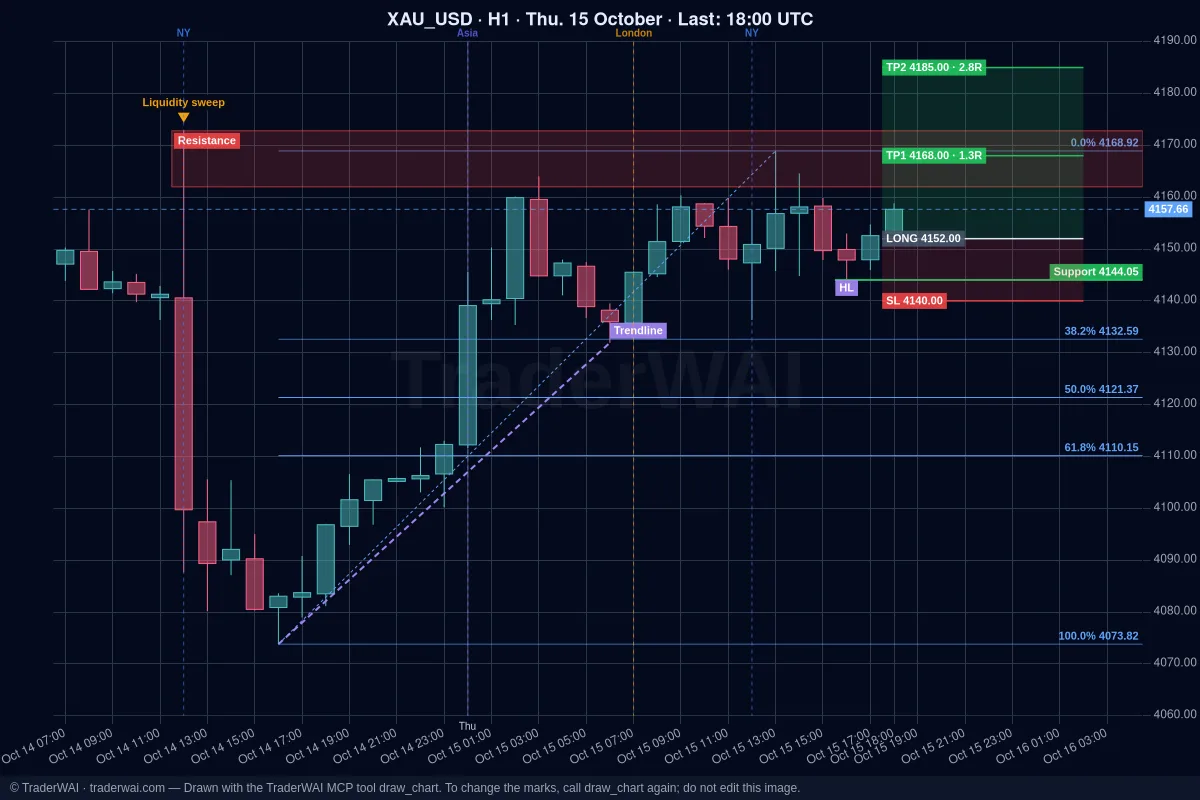
- Read the market: live charts on any timeframe, with the image and the exact candle data, so the levels it gives you come from real prices.
- Read your account: balance, equity, open positions, pending orders and closed trades.
- Place orders: market, limit or stop, always with a stop loss, sized from the risk you ask for.
- Mark your chart: support and resistance, Fibonacci, structure and the trade with entry, stop and targets.
- Wait for you: conditional orders that act when a level breaks or a candle closes, and exit rules on open positions.
Without a connector, ChatGPT can only comment on a screenshot you paste. It can't see your account and it can't send an order.
Which brokers and platforms work
You don't connect "a broker", you connect the platform your broker gives you. If your account is on one of these, it works, demo or live:
| Platform | Examples | TraderWAI plan |
|---|---|---|
| MetaTrader 5 and 4 | Exness, IC Markets, Pepperstone, XM, most prop firms | Trader |
| cTrader | IC Markets, Pepperstone, FTMO, FundedNext | Free |
| TradeLocker | HeroFX, Blue Guardian, many new prop firms | Free |
| Match-Trader | FundedNext, FundingPips | Free |
| DXtrade (beta) | FXIFY, Blueberry Markets | Free |
| Capital.com (beta) | Capital.com | Free |
| Binance, Bybit | Crypto | Free |
tastytrade (US futures, beta) also works. TraderWAI is independent and not affiliated with tastytrade.
Not sure which platform you have? Look up your broker on the brokers page, or read which brokers you can connect to ChatGPT, Claude or Grok.
Step 1: add TraderWAI to ChatGPT
You do this once, from a computer:
- Open chatgpt.com and go to Plugins in the left menu.
- Click Add (top right) → Add custom MCP server.
- Name:
TraderWAI. Server URL:https://mcp.traderwai.com. Authentication: OAuth (leave the advanced settings as they are). - Tick I understand and want to continue and click Create as plugin.
- Click Connect TraderWAI, sign in with Google and accept. If you don't have a TraderWAI account yet, it's created in this step.
- In any chat, type @ and pick TraderWAI, or just ask.
After that it also works in the ChatGPT app on your phone.
Step 2: connect your trading account
In the TraderWAI panel go to Settings → Brokers → Add account and choose your platform:
- MetaTrader 5 or 4: account number, password and server, exactly as they appear in MetaTrader. The first connection takes 1 to 3 minutes while the terminal is prepared in the cloud.
- cTrader: you're sent to cTrader to approve access with your cTrader ID. You never share your password.
- TradeLocker, Match-Trader, DXtrade: the email or username, password and server you use on the platform.
- Capital.com: an API key you create in Capital.com, with its own password.
- Binance and Bybit: an API key with trading enabled and withdrawals disabled. TraderWAI can trade with it but can never move your funds out.
Start with a demo account. Everything works the same, and you can see how ChatGPT reads your instructions before you use real money.
Detailed guides: ChatGPT + MetaTrader 5, ChatGPT + cTrader, ChatGPT + TradeLocker.
Step 3: talk to it
No special syntax. Ask the way you'd ask a colleague:
- "Show me EUR/USD on H1 and H4. What's the trend and where are the key levels?"
- "What's my balance, and which positions are open right now?"
- "Buy gold at market, stop below the Asian session low, target 2R, risk 0.5%."
- "If EUR/USD closes an M15 candle above 1.0950 before 16:00 UTC, buy with a stop below the candle low."
- "When my gold trade reaches 1R, move the stop to break-even."
Before an order, ChatGPT checks your broker's live price, calculates the size from your risk and checks your risk limits. ChatGPT also asks you to confirm any action that changes something, like placing an order.
MT5 + ChatGPT: what's different
MetaTrader is the most common case, so a few specifics:
- No EA and no terminal on your computer. The MetaTrader terminal runs in TraderWAI's cloud, so it keeps working when your PC is off.
- MT4 and MT5 both work, demo or live.
- Symbols are mapped for you. If your broker calls gold XAUUSDm or GOLD, you can still just say "gold".
- Plan: MetaTrader accounts start with the Trader plan, which includes one. If you want to try the flow first, use cTrader or TradeLocker on the Free plan.
Is it safe?
The worry is fair: you're giving an AI access to your money. This is how TraderWAI handles it:
- You authorize the connection. You choose which account to connect, and you can disconnect it at any time.
- Every order has a stop loss. An order without a stop isn't accepted.
- Orders wait for your approval by default. Auto-execution is opt-in, per symbol, with your own size and daily caps (Plus plan and higher).
- Risk limits per account (max lots, open positions, trades per day, daily loss) are checked before every order, on the Plus plan and higher. ChatGPT can read them but can never change them.
- Credentials stay encrypted and are never shown to ChatGPT. Crypto API keys can't withdraw.
- Notifications: you get an email and a push notification for every order your AI places.
What does it cost?
Custom MCP servers work on every ChatGPT plan, so the ChatGPT side can be free. On TraderWAI, charts and market data are unlimited on the Free plan, and cTrader, TradeLocker, Match-Trader, DXtrade, Capital.com, Binance and Bybit work on it (1 account, 5 order executions a day). MetaTrader needs the Trader plan. See pricing.
Connect for free: add https://mcp.traderwai.com in ChatGPT's Plugins, connect a demo account and ask for your first chart.
Common questions
What's the best brokerage plugin for ChatGPT? Look for one that supports your platform, runs in the cloud, forces a stop loss on every order, lets you approve orders and has risk limits the AI can't change. We compare the options in best MCP servers for trading.
Does my broker have its own ChatGPT plugin? Almost no broker publishes one. You connect through the platform your account runs on.
Does it work on ChatGPT Free? Yes. Custom MCP servers work on every ChatGPT plan.
Can I use Claude instead? Yes, the same server works in Claude: see Claude + MetaTrader 5.
Can ChatGPT trade while I sleep? Only if you turn on auto-execution for a symbol, or leave a conditional order with its own expiry. Otherwise every order waits for you.
Trading involves risk and you can lose money. TraderWAI is a technology tool, not investment advice.