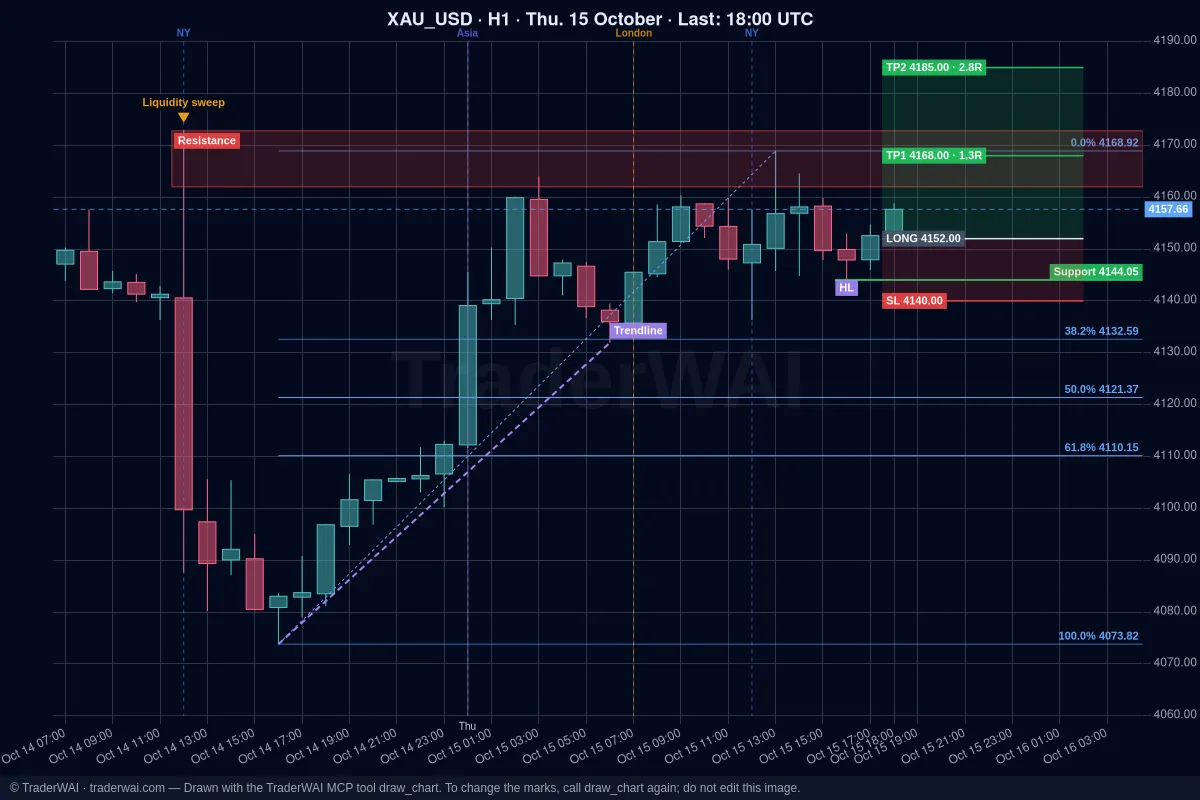
ChatGPT is good at reasoning about a trade, but on its own it can't see your cTrader account, the live chart or your open positions, and it can't send an order. TraderWAI is the bridge: a connector (an MCP server) you add to ChatGPT once. After that, ChatGPT can read your cTrader account, look at live charts, mark them for you and place orders, always within the rules you set.
cTrader is included in TraderWAI's Free plan, so you can try the whole flow without paying for TraderWAI.
What you need
- A paid ChatGPT plan (Plus, Pro, Business or Enterprise). Custom connectors need Developer mode, which the free plan doesn't have. On a budget? Claude's free plan works with the same connector: see the Claude + cTrader guide.
- A computer to add the connector on chatgpt.com. Once it's added, it also works in the ChatGPT app on your phone.
- A cTrader account, demo or live, from any broker that offers cTrader.
- A free TraderWAI account. If you don't have one, it's created in step 1.
Step 1: add TraderWAI to ChatGPT
- Open chatgpt.com and go to Settings → Apps & Connectors → Advanced settings.
- Turn on Developer mode.
- Back in Apps & Connectors, click Create.
- Name:
TraderWAI. URL:https://mcp.traderwai.com. Authentication: OAuth. - Click Create and sign in with Google. If you don't have a TraderWAI account yet, it's created in this step.
- In a new chat, enable TraderWAI from the + menu → Developer mode.
Step 2: connect cTrader
In the TraderWAI panel go to Settings → Brokers → Add account → cTrader. You'll be sent to cTrader to approve access with your cTrader ID; you never share your password with us. Choose the account (demo or live) and you're done.
Start with a demo account. Everything works the same, and you can see how ChatGPT interprets your instructions before using real money.
There's also a short page with just the setup: connect ChatGPT to cTrader.
Step 3: ask ChatGPT
You don't need special commands. Ask the way you'd ask a colleague.
Analysis with charts. ChatGPT looks at the chart image and the exact candle data, so the levels it gives you come from real prices:
- "Show me EUR/USD on H4 and M15. What structure do you see, and where are the key levels?"
- "Show my open cTrader positions and the floating P/L."
Charts marked by the AI. ChatGPT decides what to mark and TraderWAI draws it on the real chart: support and resistance, zones, trend lines, Fibonacci, liquidity sweeps, structure labels like BOS or CHoCH, and the trade with entry, stop and targets. The image appears in the chat.
- "Draw the key support and resistance levels on gold H1, a Fibonacci of the last impulse and the trade you'd propose, with stop and targets."
- "Draw the EUR/USD structure on H4 with HH, HL and the last BOS."
More in your AI draws on your chart.
Orders. Before an order, ChatGPT checks your broker's live price and sizes the trade from your risk. By default every order waits for your authorization.
- "Sell EUR/USD at market with a stop above 1.0915 and a 2R target, risking 0.5% of my balance."
Conditional orders. TraderWAI checks a rule every minute with real candles (a level crossed, a candle close above or below, a range breakout, a liquidity sweep, a time) and then places the order or creates one for you to authorize. Entry rules last up to 24 hours.
Exit rules. You can also attach a rule to an open position: close it (in full or in part) or move the stop when the rule is met. TraderWAI checks it every minute, even if you close the chat. If the position closes first, the rule cancels itself.
- "Watch my gold buy: if there's a CHoCH on M15 against it, close it."
- "When EUR/USD reaches 1R, move the stop to break-even."
A CHoCH isn't a magic condition: ChatGPT turns it into a concrete level from the candle data, for example "if an M15 candle closes below the last higher low, close the buy". See exit rules: CHoCH and break-even.
What each plan includes
- Free: 2 broker accounts, 5 order executions a day, 2 active conditional orders, 5 marked charts a day, unlimited analysis and charts, and orders to authorize.
- Plus ($9.90/month or $69/year, 7-day trial with card): 3 accounts, 25 executions a day, auto-execution, 5 active conditional orders, unlimited marked charts and basic risk limits.
Exit rules count toward your active conditional orders. See all plans on the pricing page.
Keep control
- Orders to authorize are the default. Auto-execution is opt-in, per symbol, with your own size and daily caps.
- Risk limits per account (max lots, daily loss, drawdown, trading hours, symbols) are checked before every order. Only you can change them, from the website; your AI can read them but never change them.
- You get an email and a push notification for every order your AI places.
If you trade a prop firm challenge on cTrader, check that the firm allows AI-assisted trading and set its rules as limits: see prop firm rules with AI.
Common questions
Is it free? TraderWAI's Free plan includes cTrader. ChatGPT needs a paid plan for custom connectors; Claude's free plan works too.
Does ChatGPT see my cTrader password? No. Access is granted through your cTrader ID and you can revoke it anytime.
I connected before and ChatGPT doesn't draw charts. The list of tools is saved when you connect. Disconnect TraderWAI in ChatGPT and connect it again.
Is an exit rule the same as a stop loss? No. For instant exits at a price, use your broker's stop loss. Exit rules are for structure, candle closes and times, checked once a minute with TraderWAI's data feed, which can differ by a few points from your broker.
Trading involves risk and you can lose money. TraderWAI is a technology tool, not investment advice.