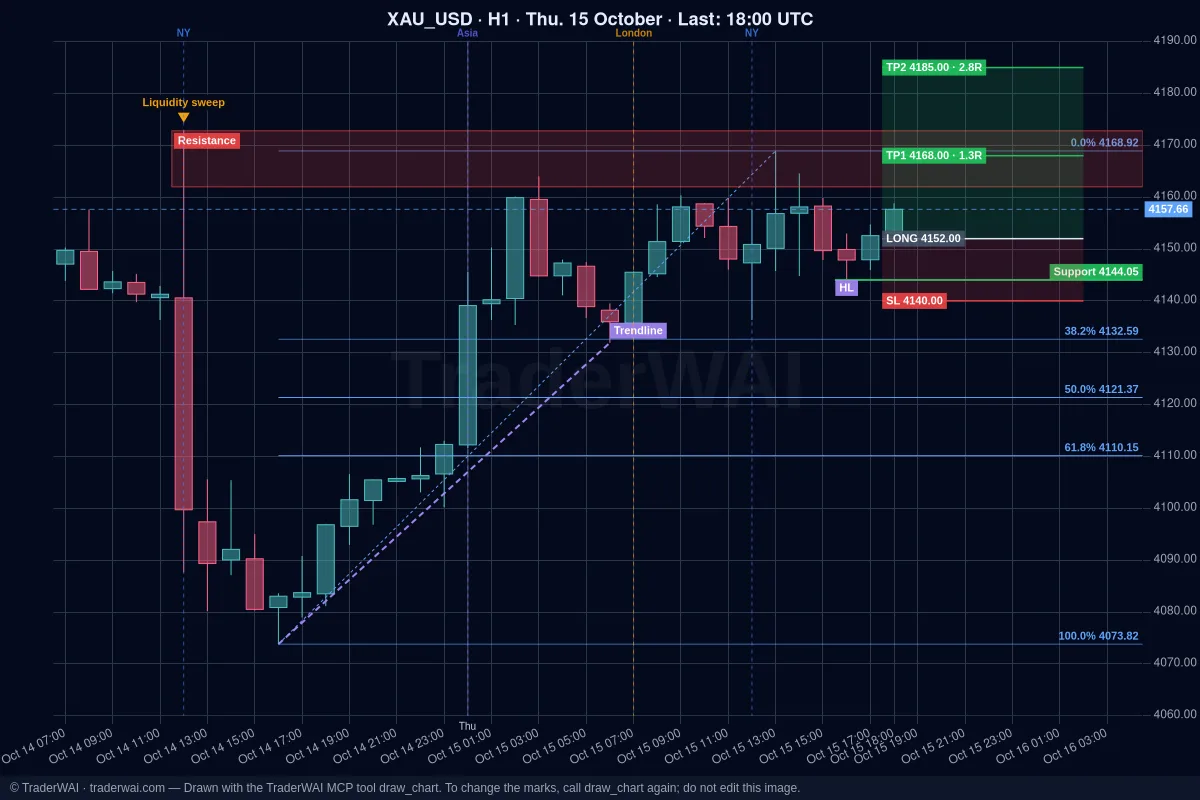
Grok searches the web and X in real time, so it knows what is moving the market. What it can't do on its own is see your cTrader account or send an order. TraderWAI adds that: a connector (an MCP server) you add to Grok once. After that Grok can read your cTrader balance and positions, look at live charts, mark them for you, run backtests and prepare orders with stop loss and take profit that you approve.
cTrader is the easiest platform to connect: one button and your cTrader ID, without typing or sharing any password. And it's included in TraderWAI's Free plan.
What you need
- Grok with custom connectors on grok.com or the Grok app. At the time of writing, xAI offers them on its paid plans; if you don't see New Connector → Custom, your plan or region doesn't have it yet.
- A cTrader account, demo or live, from any broker or prop firm that offers cTrader, linked to your cTrader ID.
- A TraderWAI account. It's created when you authorize Grok. The Free plan includes one broker account, 5 order executions a day, 1 new conditional order a day (2 active), 5 marked charts a day and 5 backtests a day over the last 14 days; charts and analysis are unlimited.
Step 1: add TraderWAI to Grok
- Open [grok.com/connectors](https://grok.com/connectors) (in the app: Settings → Connectors).
- Click New Connector and choose Custom.
- Name:
TraderWAI. Server URL:https://mcp.traderwai.com - Save. A TraderWAI window opens: sign in with Google or Microsoft and allow access. If you don't have a TraderWAI account yet, it is created here.
- Open a new chat and check it works: "Using TraderWAI, show me the EUR/USD H1 chart."
The Grok + cTrader guide has a button that opens Grok's connectors and the URL ready to copy.
Step 2: connect cTrader with one button
- In the TraderWAI dashboard go to Settings → Brokers → Add account → cTrader.
- Click Connect with cTrader. cTrader's own page opens: sign in with your cTrader ID and approve access.
- Choose the account you want to use (demo or live). Done.
You never share your password with TraderWAI, and you can revoke the access at any time from your cTrader ID.
You can also do it from the chat: "Using TraderWAI, connect my cTrader demo account." Grok gives you an authorization link; open it in your browser, sign in with your cTrader ID and the account is saved to TraderWAI.
Start with a demo account: everything works the same and you can see how Grok behaves without risk.
Step 3: what to ask Grok
Positions and balance
- "Using TraderWAI, what's my cTrader balance and equity, and which positions are open with their floating P/L?"
Analysis and a marked chart
- "Look at EUR/USD on H4 and M15. What's the structure, and where are the key levels?"
- "Draw on gold H1 the key support and resistance levels, a Fibonacci of the last impulse and the last BOS or CHoCH." TraderWAI draws it on the real chart and the image appears in the chat.
An order you approve
- "Sell EUR/USD at market with the stop above the last H1 swing high and a 2R take profit, risking 0.5% of my balance. I'll approve it."
Before any order TraderWAI checks your broker's live price, sizes the trade from your risk and checks your risk limits. By default the order waits for your approval in TraderWAI (you get a notification); it is only sent on its own if you turned on auto-execution for that symbol.
A conditional exit
- "Create a rule on my EURUSD position: when it is 1R in profit, move the stop loss to break-even." TraderWAI checks conditional rules every minute, even with Grok closed.
A backtest
- "Backtest selling gold when price sweeps the Asian session high and an M5 candle closes back below, stop above the wick, 2R target, last 14 days." More in backtest a strategy with Grok.
Grok can combine this with its own search: "What's the news on gold today and what are traders saying on X? Then check the H1 chart and my open XAUUSD trade."
If it doesn't work
- Grok doesn't use the TraderWAI tools. Start a new chat and name it in your request ("Using TraderWAI…"). If it still doesn't, check in grok.com/connectors that the connector is there and connected; remove it and add it again if needed.
- The sign-in window doesn't open or loops. Allow pop-ups for grok.com and sign in with the same Google or Microsoft account you use on TraderWAI. Check the URL is exactly
https://mcp.traderwai.com. - The cTrader window closes and no account appears. You probably signed in with a different cTrader ID. Sign in with the cTrader ID that holds the trading account.
- My account isn't in the list. The account must be linked to your cTrader ID. Open your broker's cTrader, sign in with that cTrader ID and check the account shows up there, then connect again.
- No "New Connector" in Grok. Custom connectors aren't available on your plan or region yet. The same TraderWAI account works with Claude or ChatGPT, including their free plans.
Common questions
Is TraderWAI made by xAI or Spotware? No. TraderWAI is an independent service that works with Grok through the open MCP standard and connects to cTrader through cTrader's official Open API authorization.
Does Grok see my cTrader password? No. You sign in on cTrader's own page with your cTrader ID; TraderWAI never receives your password and the AI never sees any credentials.
Do I need to keep cTrader open? No. The connection runs in the cloud; your platform and computer can be off.
Can Grok trade without me? Only if you turn on auto-execution for a symbol (from the Plus plan), with your own size and daily caps. By default every order waits for your approval, and your risk limits are checked before each one. Grok can read the limits but never change them.
Does it work with prop firms? Yes, if your challenge runs on cTrader (FTMO and others offer it) and the firm allows AI-assisted trading. Set its rules as TraderWAI risk limits: see prop firm rules with AI and Grok for prop firm traders.
Is it free? On TraderWAI, yes: cTrader is included in the Free plan. On Grok's side, custom connectors need a paid xAI plan at the time of writing.