Gold reacts to the Fed, inflation data, the dollar and headlines, often within minutes. Grok is good at that part: it searches the web and X in real time, so it can tell you what is moving XAUUSD right now. What it can't do on its own is see a live chart, read your account or send an order. TraderWAI adds that: a connector (an MCP server) you add to Grok once. Then Grok can read live gold charts, mark the structure, backtest a setup and prepare orders with stop loss and take profit that you approve.
Who does what: the news and sentiment come from Grok's own search; charts, prices, your account and the orders come from TraderWAI and your broker.
Connect in 2 minutes
- Open [grok.com/connectors](https://grok.com/connectors) (in the app: Settings → Connectors).
- Click New Connector and choose Custom.
- Name:
TraderWAI. Server URL:https://mcp.traderwai.com - Save and sign in with Google or Microsoft. If you don't have a TraderWAI account yet, it is created here.
At the time of writing, xAI offers custom connectors on its paid plans; if you don't see New Connector → Custom, your plan or region doesn't have it yet. Then add your broker account in TraderWAI (Settings → Brokers → Add account): see the platform guides below.
1. News first, then the chart
Start with what Grok does best and then check it against price:
News and sentiment
- "What's moving gold today? Check the news and X: Fed speakers, US data, the dollar. Is there anything on the calendar in the next few hours?"
Top-down read
- "Using TraderWAI, look at XAUUSD on H4, H1 and M15. What's the structure on each timeframe, and where are the key levels?"
Grok gets the chart image (to read structure and patterns) and the exact candle data (for precise levels), updated every minute. It can work with the levels gold traders watch: the Asian session range, the previous day's high and low, swing highs and lows (HH, HL, LH, LL), BOS and CHoCH, and supply and demand zones.
2. Let Grok mark the chart
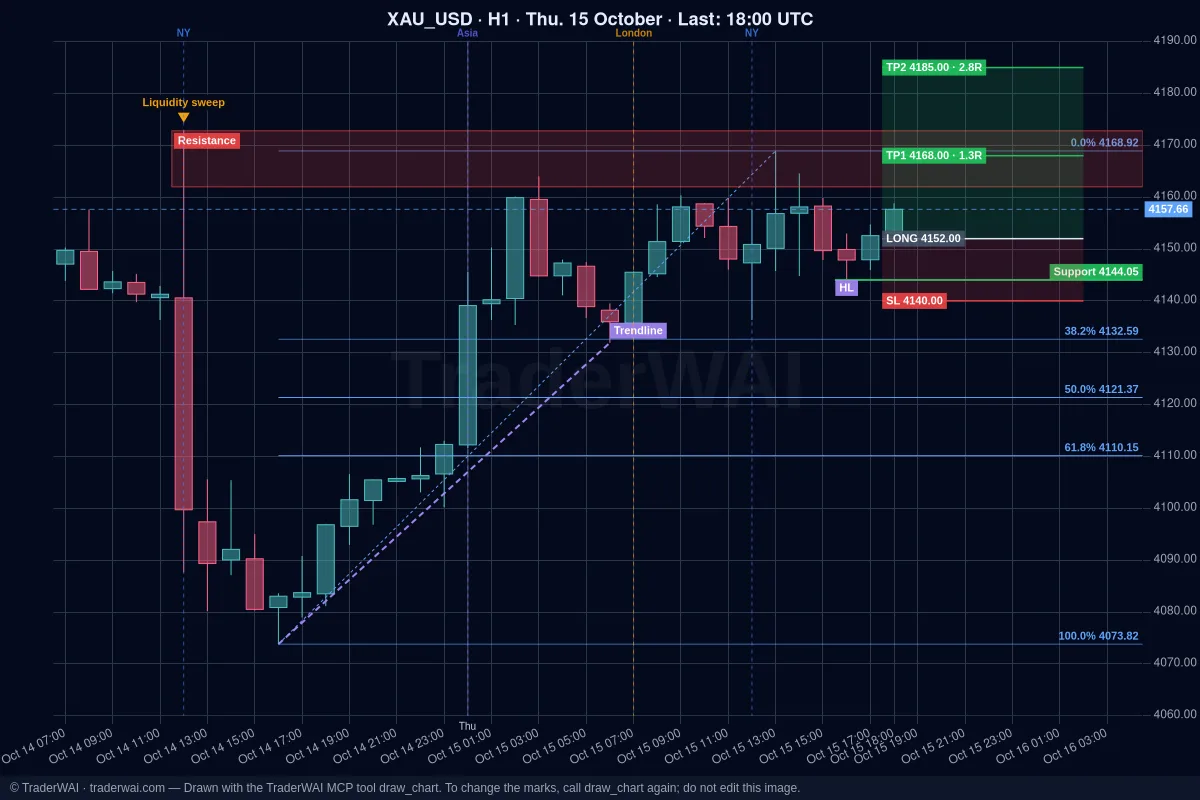
Grok decides what to draw and TraderWAI draws it on the real chart, with live candles; the image appears in the chat.
Marked chart
- "Draw on gold H1 the Asian range, yesterday's high and low, the last BOS and the supply and demand zones, and the trade you'd propose with stop and targets."
The Free plan includes 5 marked charts a day; Plus and above, unlimited. Plain charts and analysis are unlimited on every plan.
3. Test the setup before risking money
A classic gold setup is the liquidity sweep of the Asian range: price takes the Asian high, then closes back inside. Test it on history first:
Backtest
- "Backtest selling XAUUSD when price sweeps the Asian session high between 07:00 and 10:00 UTC and an M5 candle closes back below it. Stop above the wick, target 2R."
You get every trade, the win rate, the total in R and the drawdown. The Free plan tests the last 14 days (5 backtests a day); Trader goes back 1 year and Max 2 years. More in backtest a strategy with Grok.
4. An order sized by risk, that you approve
Order to approve
- "Sell gold at market with the stop above the sweep wick and a 2R target, risking 0.5% of my balance. Show me the lot size first. I'll approve it."
Size by risk, not by lots: a 10-dollar stop on gold is very different from 10 pips on EUR/USD, so let TraderWAI calculate the size from your risk percentage. Before any order TraderWAI checks your broker's live price and your risk limits. By default the order waits for your approval in TraderWAI (you get a notification); it is only sent on its own if you turned on auto-execution for XAUUSD.
5. Let TraderWAI watch the market
You don't need to stare at the London open. Turn the setup into a conditional order and TraderWAI checks it every minute with real candles, even with Grok closed:
Entry rule
- "If gold sweeps the Asian high and an M5 candle closes back inside the range before 10:00 UTC, prepare a sell with the stop above the wick and a 2R target."
Exit rules
- "On my XAUUSD buy: when it is 1R in profit, move the stop loss to break-even."
- "If there's a CHoCH against my gold trade on M15, close it."
A CHoCH becomes a concrete level: Grok takes it from the candle data, for example "if an M15 candle closes below the last higher low, close the buy". On the Free plan you can create 1 new conditional order a day, with 2 active.
Things to keep in mind with gold
- Spreads and news. Spreads widen around the daily rollover and big releases. Avoid market orders right at those moments.
- Data source. Charts come from TraderWAI's market feed, which can differ slightly from your broker's prices; orders always use your broker's live price.
- Instant exits belong to the stop loss. Conditional exit rules are checked once a minute; for exits at an exact price, use the stop loss at your broker.
More on the workflow in trading gold with AI.
Which platform
Gold works with any broker that offers XAUUSD on these platforms:
- MetaTrader 5: Grok + MT5. MetaTrader starts with the Trader plan.
- cTrader: Grok + cTrader. Included in the Free plan.
- TradeLocker: Grok + TradeLocker. Included in the Free plan.
- Match-Trader and DXtrade: Grok + Match-Trader and Grok + DXtrade.
Start with a demo account: everything works the same and you can see how Grok behaves without risk.
Common questions
Can Grok read gold news? Yes, through its own web and X search. TraderWAI is not a news feed: it gives Grok charts, prices and your account. The order still uses your broker's live price, is sized from your risk and waits for your approval.
Does Grok trade gold on its own? Only if you turn on auto-execution for XAUUSD, with your own size and daily caps. By default every order waits for your approval, and your risk limits are checked before each one. Grok can read the limits but never change them.
Can I do it for free? Charts and analysis are unlimited on every plan. To place orders on the Free plan (1 broker account, 5 order executions a day), connect cTrader, TradeLocker or Match-Trader; MetaTrader starts with the Trader plan.
Is TraderWAI made by xAI? No. TraderWAI is an independent service that works with Grok through the open MCP standard.