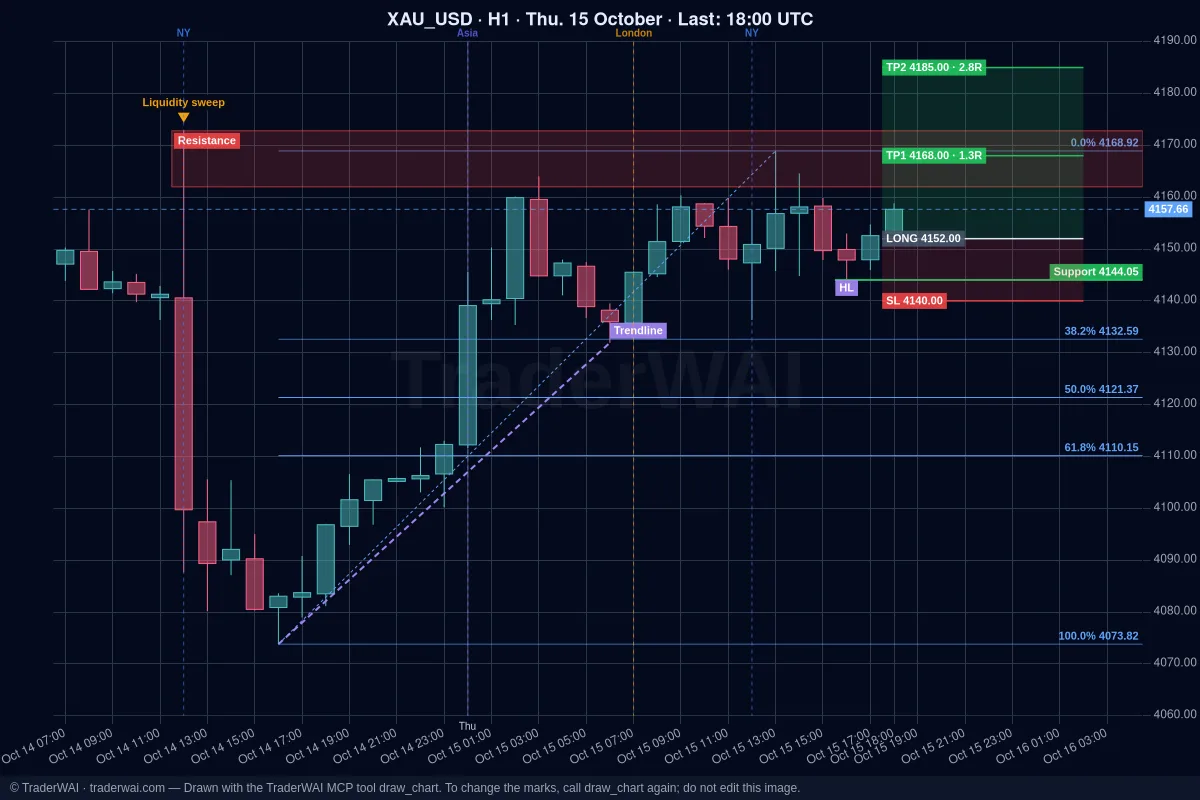
Ask ChatGPT or Claude about Nvidia and you get a good explanation of the company. Ask it to look at today's NVDA chart, test a setup or place the trade, and on its own it can't: it has no live prices, no history and no access to your broker. TraderWAI adds that. It's a connector (an MCP server) you add to your AI once, and since November 2026 it covers 55 of the most traded US stocks, from Nvidia, Apple, Microsoft and Tesla to JPMorgan, Coca-Cola or Exxon Mobil.
Your AI can then read the live chart, run a backtest on real 1-minute data and prepare an order with stop loss and take profit on your broker, which you approve.
Which stocks and how they are traded
- 55 large US companies with a lot of volume: Nvidia (
NVDA_USD), Apple (AAPL_USD), Microsoft (MSFT_USD), Amazon (AMZN_USD), Alphabet (GOOG_USD), Meta (META_USD), Tesla (TSLA_USD), Broadcom, AMD, Netflix, JPMorgan, Visa, Eli Lilly, Walmart and more. Ask your AI "Which stocks does TraderWAI have?" to see the full list. - They are traded as CFDs on the share at brokers that offer them: MetaTrader 4/5 (for example at IC Markets or Vantage), cTrader, TradeLocker, Match-Trader, Capital.com or eToro. TraderWAI finds the name your broker uses for each share (NVDA.NAS, #NVDA, NVDA.US…); if it isn't sure, it says it can't find it instead of trading a different instrument.
- Regular New York session only. Charts, backtests and conditional orders use the regular session (9:30 to 16:00 New York time). Many brokers quote stock CFDs only in that window, sometimes starting a few minutes after the open and stopping a few minutes before the close.
Step 1: connect TraderWAI to your AI
Claude (every plan, Free included): on claude.ai open Settings → Connectors → Add custom connector, name TraderWAI, URL https://mcp.traderwai.com, then Connect and sign in with Google.
ChatGPT (every plan, Free included): on chatgpt.com open Plugins → Add → Add custom MCP server, URL https://mcp.traderwai.com, authentication OAuth, then Create as plugin and Connect TraderWAI.
If you don't have a TraderWAI account yet, it's created when you sign in. Charts and analysis are free and unlimited, so you can start here without connecting any broker.
Step 2: analyse the chart
Ask the way you'd ask another trader:
- "Using TraderWAI, show me Nvidia on D1 and H1. What's the trend, and where are the key levels?"
- "Compare Apple and Microsoft on H4 over the last two weeks. Which one is stronger?"
- "Draw the support and resistance of Tesla's last month on the chart."
Your AI gets the chart image and the exact candles (open, high, low, close) on any timeframe from M1 to D1, and can mark levels, zones and the trade plan on the real chart.
Step 3: test the idea on 2 years of data
Before risking money, ask how the rule would have done:
- "Backtest buying NVDA when an M5 candle closes above the high of the first 30 minutes of the New York session. Stop at the low of that range, target 2R, close at 15:45 New York time if neither is hit."
- "Same test on AAPL, MSFT and TSLA. Which one holds up best?"
- "Only take it if price is above the D1 EMA 50."
You get every trade, the win rate, the result in R and the drawdown in a few seconds. The test only uses session hours, so a stop is never "hit" by a price from the middle of the night. How far back you can go depends on your plan: 14 days on Free, 6 months on Plus, 1 year on Trader and all 2 years of 1-minute history on Max.
Step 4: place the order (you approve it)
To trade, connect your broker account in TraderWAI (Settings → Brokers → Add account). Start with a demo.
- "Buy Apple at market with the stop below today's low and a 2R target, risking 0.5% of my balance."
- "Place a buy limit on Nvidia at the H1 support you marked, stop 1% below, target at the previous high."
Before the order, TraderWAI checks your broker's live price, finds the share's name on your broker, sizes the trade from your risk and checks your risk limits. By default the order waits for your approval; it's only sent on its own if you turn on auto-execution for that symbol.
You can also leave a conditional order watching the market: "When Tesla closes an M15 candle above 300 during the session, buy with a stop below the candle, risk 0.5%." TraderWAI checks it every minute, only while the market is open.
Things to keep in mind with stocks
- Gaps. A stock can open far from yesterday's close after earnings or news. A stop does not protect you from a gap: it closes at the first available price.
- Earnings. TraderWAI's economic calendar covers macro events (CPI, payrolls, Fed), not company earnings. Check the earnings date before holding a position, or ask an AI with web search.
- Overnight costs. CFD positions held overnight usually pay financing. Check your broker's conditions.
- Your broker decides what you can trade. Not every broker or account offers every share, and some only offer them on certain platforms.
Plans
- Free: charts and analysis without limits, 1 broker account (cTrader, TradeLocker, Match-Trader, Capital.com, eToro…), 5 order executions a day, 5 backtests a day over the last 14 days and 1 new conditional order a day (2 active).
- Plus: 3 accounts, 25 executions a day, auto-execution and 6 months of history.
- Trader and Max: MetaTrader included, 100 executions a day on Trader and unlimited on Max, 1 year of history on Trader and 2 years on Max.
There are no free trials; the first month of any paid plan is 50% off.
Common questions
Can ChatGPT trade stocks? Not on its own. With TraderWAI connected, ChatGPT (and Claude, Grok or Gemini) can read live stock charts, run backtests and prepare orders on your broker that you approve.
Do I buy the real share? On most brokers you trade a CFD on the share: you follow its price without owning it. What you can trade depends on your broker and account.
Can it trade before the open or after the close? No. TraderWAI's charts, backtests and conditional orders use the regular New York session, and most brokers reject market orders on stock CFDs outside it.
Which AI is better for stocks? The one you already use. The tools are the same in Claude, ChatGPT, Grok, Gemini and Cursor; see the guides for Claude + MetaTrader 5 and ChatGPT + MetaTrader 5.
Can the AI trade without me? Only if you turn on auto-execution for a symbol, with your own size and daily caps. Your risk limits are checked before every order, and the AI can read them but never change them.