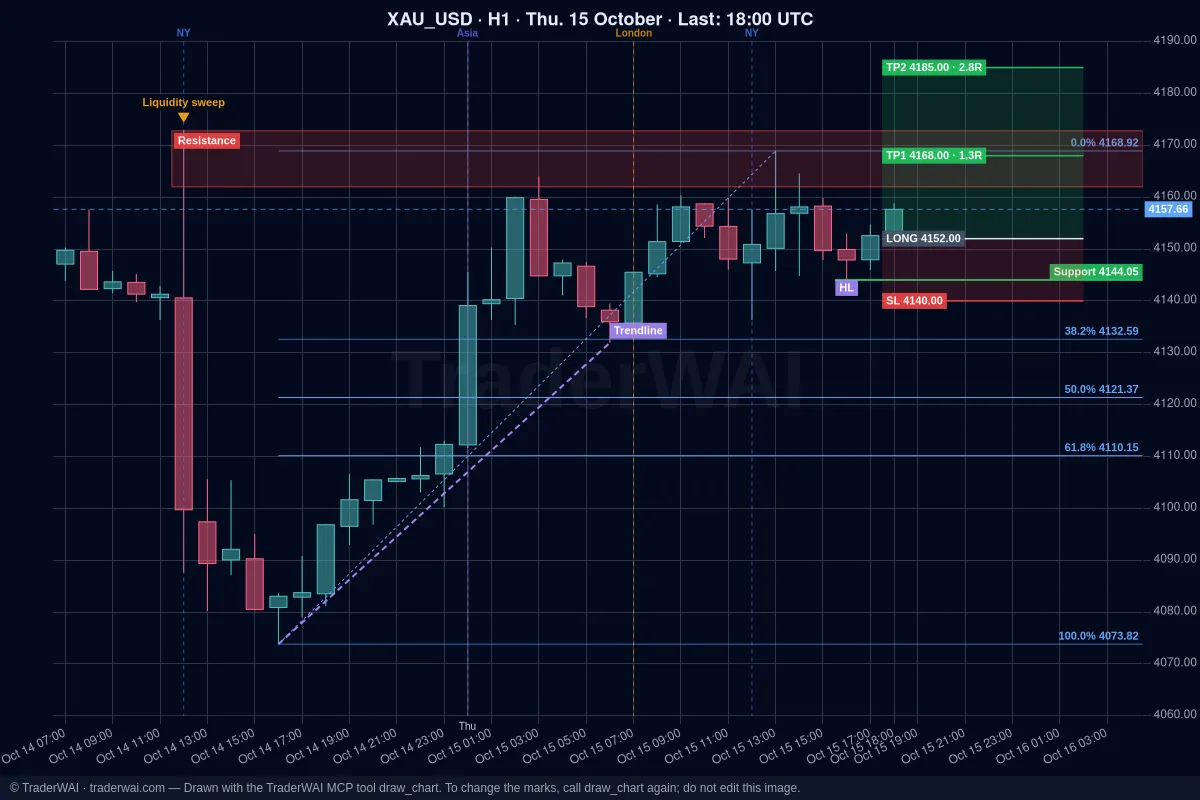

You opened a trade with a plan: "if the structure breaks against me on M15, I'm out", or "once it reaches 1R, the stop goes to break-even". The problem is being there when it happens. With TraderWAI, your AI can turn that plan into an exit rule on your open position, and TraderWAI watches it for you every minute.
What an exit rule is
An exit rule is a conditional order attached to a position that is already open. When the rule is met, TraderWAI does one of two things:
- Close the position, in full or in part.
- Modify it: move the stop to break-even, set a new stop or a new target.
It's the same idea as conditional entries, but for managing the trade you already have.
Why your broker stop loss is not enough
Your stop loss reacts to one thing: price touching a level. That's exactly what you want for a hard, instant exit, and you should keep using it.
But many exits are not about a single touch. A change of character (CHoCH) is about a candle closing beyond a structural level on a specific timeframe. A wick through the level and back is not a CHoCH; a full M15 close below it is. A broker stop can't tell the difference. The same goes for "close it at 21:00 UTC" or "close half if H1 closes above this level". Those are rules about structure, candle closes and time, and that's what exit rules are for.
How the AI turns "CHoCH on M15" into a rule
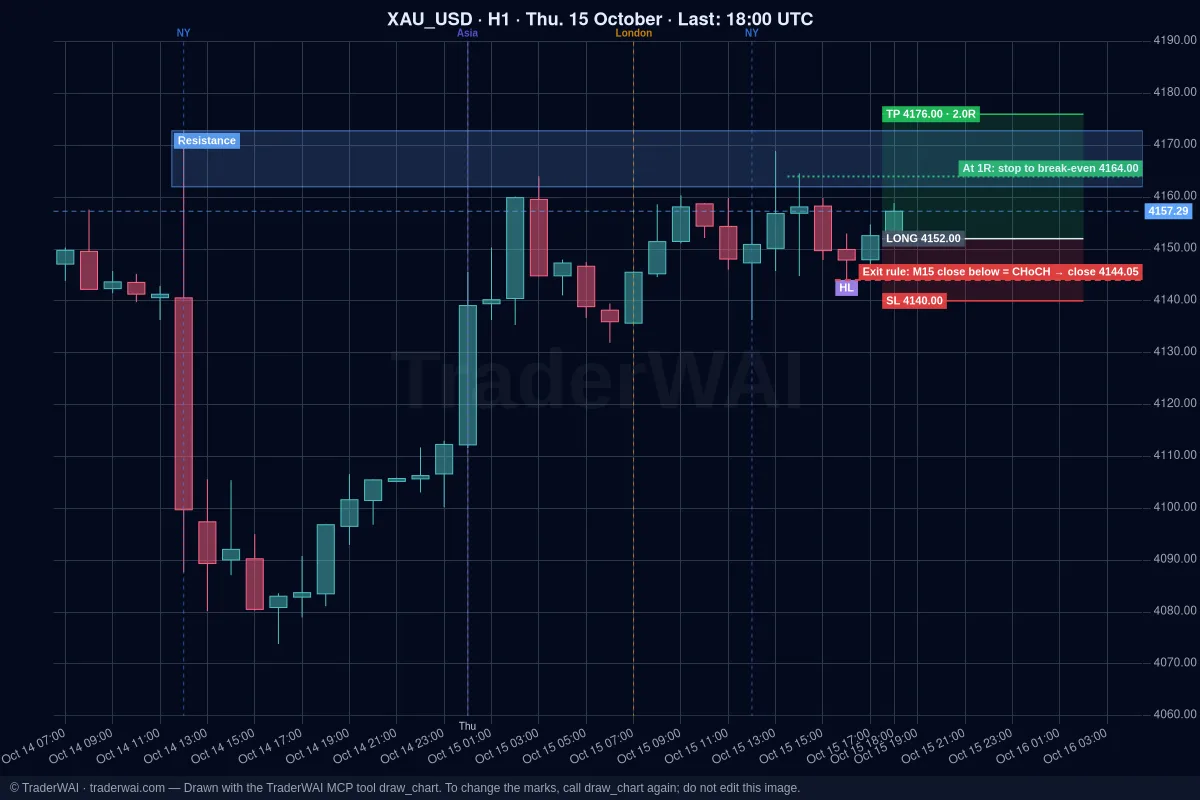
A CHoCH is not a magic condition that TraderWAI understands on its own. Your AI translates it into a concrete level and a concrete trigger.
Say you're long gold and you ask: "Watch my gold buy: if there's a CHoCH on M15 against me, close it." The AI looks at the M15 candles, finds the last higher low of the move (taking the price from the candle data, not from reading the image) and creates a rule like: "If an M15 candle closes below this level, close the buy." For a sell, the mirror image: an M15 close above the last lower high.
Break-even works the same way. "Move my stop to break-even at 1R" becomes: "When price reaches entry plus the distance to the stop, move the stop to the entry price."
The AI tells you the exact level and trigger it chose, so you can check them before relying on the rule.
Four exit rules you can ask for
Just describe them in plain words:
- Close on a CHoCH: "Watch my gold buy: if there's a CHoCH on M15 against me, close it."
- Break-even at 1R: "When EUR/USD reaches 1R, move the stop to break-even."
- Time exit: "If the trade is still open at 21:00 UTC, close it."
- Partial close: "Close half if an H1 candle closes above 1.0950."
What happens after you create it
- Checked every minute with real candles on the TraderWAI feed.
- Works with the chat closed. The rule lives on TraderWAI, not in the conversation.
- Lasts up to 7 days. Entry conditionals last up to 24 hours; exit rules stay longer because trades do.
- Cancels itself if the position closes first, by stop loss, target or by hand. No orphan rule closing something that's no longer there.
- Doesn't use your daily executions.
- Counts toward your active conditional slots: Free 2, Plus 5, Trader 10, Max 30.
It works on every supported platform: MetaTrader 4/5, cTrader, TradeLocker, Match-Trader, DXtrade, Binance and Bybit.
Honest limits
- Once a minute, not tick by tick. Exit rules are checked every minute, so they suit candle closes, structure and time. For an instant exit on price, use the stop loss at your broker. The best setup is usually both: a broker stop as the safety net and an exit rule for the structural exit.
- TraderWAI's feed, not your broker's. Rules are evaluated on the TraderWAI price feed, which can differ by a few points from your broker. Keep that in mind for levels that are very tight to price.
- The level is only as good as the analysis. The AI picks the last higher low from the candles, but structure is still a judgement. Look at the level it proposes before you leave it running.
Draw it first, then turn it into rules
Exit rules pair well with the chart drawing guide. Ask your AI to mark the structure on your chart (HH, HL, the last BOS, your entry, stop and targets with their R) and check the levels visually. Then ask it to turn them into rules: "Use that HL as the CHoCH exit and move the stop to break-even at 1R."
How to set it up
- Connect your AI. Add TraderWAI as a connector in Claude, ChatGPT or another AI with the URL
https://mcp.traderwai.com. Follow the connection guide. - Connect your broker. In the TraderWAI panel go to Settings → Brokers → Add account and choose your platform. Start with a demo account.
- Ask. Open a trade, or point to one you already have, and describe the exit you want.
Common questions
Do I still need a stop loss? Yes. Exit rules are checked once a minute; the broker stop is your instant protection on price. Use both.
What if I close the trade myself? The exit rule cancels itself. The same happens if the stop or the target is hit first.
Does it work on the Free plan? Yes. Free includes 2 active conditional orders, and exit rules don't use your 5 daily executions.
Does it work with MetaTrader? Yes, on every supported platform. MetaTrader accounts start with the Trader plan; cTrader, TradeLocker, Match-Trader, DXtrade, Binance and Bybit are available from the Free plan.
Trading involves risk and you can lose money. TraderWAI is a technology tool, not investment advice.