Grok Bot is xAI's agent: a bot that keeps working while you do something else, runs routines and uses the tools you connect to it. For a trader that sounds perfect, and it is also the risk: a bot that trades an idea nobody has tested is just a faster way to lose money. Grok Bot can connect to some brokers through its own connectors, but seeing an account and placing orders doesn't tell you whether the idea behind them works.
TraderWAI fills that gap. It is a connector (a remote MCP server) that gives your Bot live charts, market structure, the economic calendar and backtests on 1-minute history, and it can also place orders with stop loss on your own broker account, within the risk limits you set.
Connect TraderWAI to Grok Bot
Grok Bot is included with X Premium and higher and with Cursor Pro. Then:
- Open your Bot in Grok Bot.
- Paste this in the chat:
Add the remote MCP server https://mcp.traderwai.com - Press Connect on the card it shows and sign in with Google or Microsoft. If you don't have a TraderWAI account yet, it is created here.
- Ask for a chart or a backtest to check it works.
Step-by-step pages for each platform: Grok Bot + MetaTrader 5, Grok Bot + cTrader, Grok Bot + TradeLocker and Grok Bot + eToro.
A full example: from idea to order, on gold
Take a classic gold setup: the sweep of the Asian session high. Price takes out the Asian high in the London morning and then closes back below it. This is how the Bot checks it before risking anything.
1. Look at the market
- "Using TraderWAI, look at XAUUSD on H4 and M15. What's the structure, and where are the Asian range and yesterday's high and low?"
2. Test the idea on history
- "Backtest selling gold when the M15 candle closes below the Asian session high after sweeping it, between 07:00 and 10:00 UTC. Stop above the session high, 2R target, over the longest history my plan allows."
You get every trade, the win rate, the total in R and the maximum drawdown. Look at how many trades it was based on: a handful proves little. Then ask for one variation (another session, a filter, a different stop) and compare.
3. See the trades on a real chart
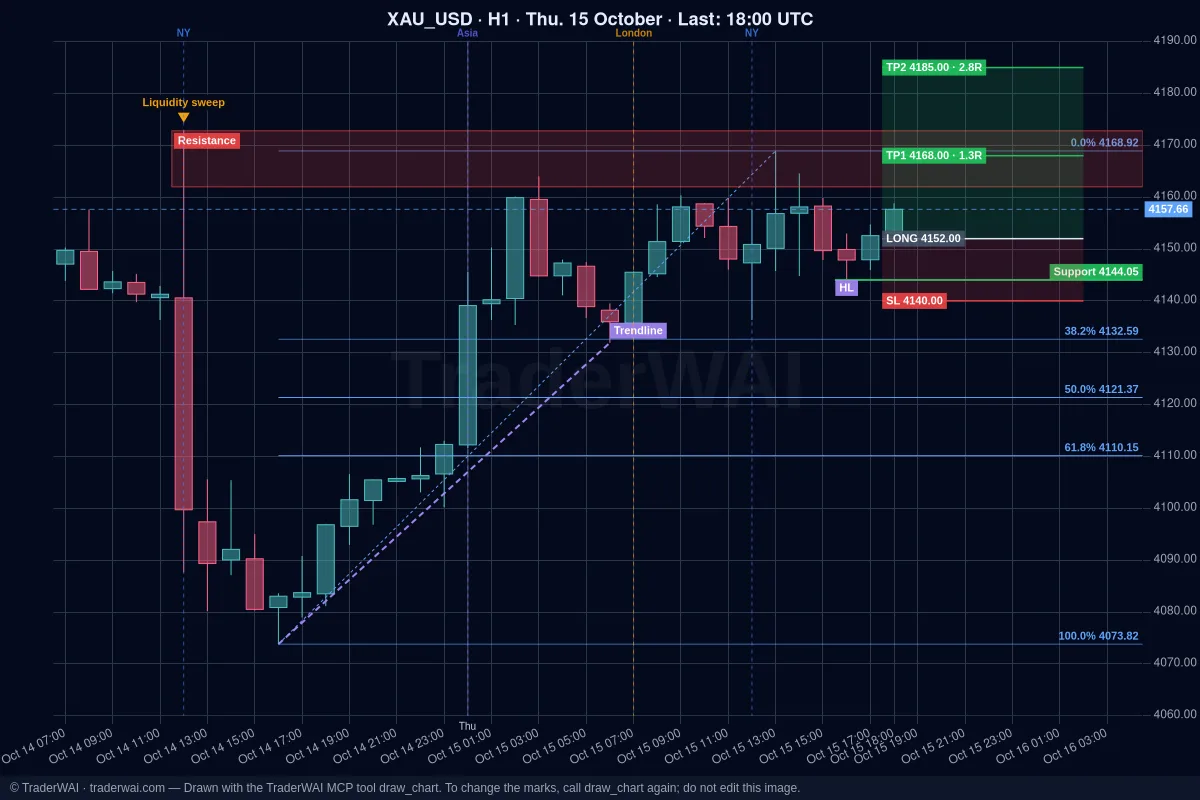
- "Mark the last five trades of that backtest and today's key levels on the gold H1 chart."
The Bot decides what to draw and TraderWAI draws it on the live chart. More in backtest a strategy with Grok.
4. Only then, an order with a stop
- "If the setup appears today, prepare a sell on my demo account with the stop above the sweep wick and a 2R target, risking 0.5% of the balance."
Orders are sized from your risk, use your broker's live price and are checked against your risk limits. By default they wait for your approval; they only go out on their own if you turned on auto-execution for that account and symbol. Start on a demo account.
A ready-made bot: Strategy Lab
If you'd rather not set it up yourself, add the public template [TraderWAI Strategy Lab](https://x.ai/bot/b4KrY6T7pRQr2NU68snzL) to your Grok Bot. You describe a trading idea in plain words; it turns it into exact rules, backtests it, marks the trades on the chart and suggests one variation to test. It also comes with a weekday morning routine that re-runs your saved strategies and sends you a gold chart with the day's levels and events. The first time, it asks you to connect TraderWAI as above.
To check a single trade instead, add [TraderWAI Trade Checker](https://x.ai/bot/BHsprYgt6Qq5Xznk_3u6d): give it the symbol, direction, entry, stop and target, and it reviews the chart and market structure, today's news and a quick backtest of the setup, then marks the plan on the chart. It only places the order if you confirm, always with a stop loss.
Let it run while you're away
Grok Bot is good at routines, and TraderWAI is good at watching the market. Combine them:
- "Every weekday at 07:00, show me gold H1 with today's key levels and the high-impact events from the economic calendar."
- "Turn the Asian-high sweep into a conditional order on my demo account: if it triggers before 10:00 UTC, sell with the stop above the wick and a 2R target."
Conditional orders are checked by TraderWAI every minute with real candles, even when your Bot isn't running.
Which plan you need
- Grok Bot: X Premium or higher, or Cursor Pro.
- TraderWAI: charts and analysis are unlimited on every plan. On the Free plan backtests cover the last 14 days (5 a day) and you can place up to 5 orders a day on 1 broker account (cTrader, TradeLocker, Match-Trader, eToro, Binance, Bybit and more). Plus goes back 6 months, Trader 1 year and includes MetaTrader, and Max 2 years.
Common questions
Does Grok Bot trade on its own with TraderWAI? Only if you turn on auto-execution for an account and symbol, with your own size and daily caps. Otherwise every order waits for your approval, and your risk limits are checked before each one.
Why not just trade with my broker's connector? Use it if you like. TraderWAI adds what comes before the order: live charts, market structure, the calendar and backtests on 1-minute history. It can also place the order on your own account, with stop loss and within your limits.
Which brokers work? MetaTrader 4 and 5, cTrader, TradeLocker, Match-Trader, DXtrade, Capital.com, eToro (beta), Binance, Bybit and more. See all platforms.
Is TraderWAI made by xAI? No. TraderWAI is an independent service that works with Grok Bot through the open MCP standard.